illustrate
Products            Buy            Support Forum            Registrations            About           
 

dBpoweramp Batch Ripper: Discussions

Collapse
X
 
  • Time
  • Show
Clear All
new posts

  • bhoar
    replied
    Re: dBpoweramp Batch Ripper: Discussions

    Originally posted by kevinoconnor
    Thanks Brendan, that's good to know. I wrote the command-line utility, so it's easy enough to change what parameters it takes (or are ignored).
    ...
    It works well, but one thing I noticed is that it seems to load one or two discs past the end of the batch (but doesn't rip them) before unloading and stopping.
    ...
    One thing I'm still not clear on, does a Reject happen in place of an unload or in addition to an unload? If in addition, which comes first?
    The end of batch behavior still leaves a little bit to be desired. I'm still working with spoon's suggested end of batch setting which means I have to manually end it, otherwise my loaders keep picking at empty input bins.

    Reject happens instead of an unload with rejected discs. Most robots have two output bins: one standard, one for rejects.

    I've got an NSM 100 disc changer here, FYI. Actually, strike that...checking my spreadsheet...no I don't...I've got the 150 disc one with the alternate MDI label (equivalent to the NSM Mercury 40). In any case, I'd love to check out your changer work.

    FYI, the changers I've acquired: the NSM/MDI 150, a sony CDL-2xx, a JVC MC-1600, a JVC MC-2600, a Disc NSM 6000, a Disc NSM 2000(? I think), two Plextor Megaplex 200 CD units and one or two others. Oh, and a stack of 20 or so Nakamichi 4 and 5 disc SCSI CD changers in a standard 5.25" form factor.

    Changers were second on my priority list, however...as I'm currently writing what I (perhaps egotistically) call my "Universal Loader CLI" utility for serial-based duplicator robots. It's actually in a completely usable state now, though I'd like to add some error handling (unplanned disc drops, trays not closing) and ini file support to move away from the somewhat unwieldy command lines I store in the DefaultCmdLine.txt files.

    For the changers, the plan is to harness the current dev release of mtx...if I ever get around to it.

    -brendan

    Leave a comment:


  • kevinoconnor
    replied
    Re: dBpoweramp Batch Ripper: Discussions

    Thanks Brendan, that's good to know. I wrote the command-line utility, so it's easy enough to change what parameters it takes (or are ignored).

    I have it working pretty well now as follows:

    Pre-batch - Loads up the first disc (absolute load)
    Load - Does nothing
    Unload - Moves to next disc
    Reject - Moves to next disc
    Post-batch - Unloads the last disc

    It works well, but one thing I noticed is that it seems to load one or two discs past the end of the batch (but doesn't rip them) before unloading and stopping.

    One thing I'm still not clear on, does a Reject happen in place of an unload or in addition to an unload? If in addition, which comes first?

    Also, is the freedb lookup working? I didn't set up AMG on this test box, but freedb works from the R13 CD Ripper. The batch ripper never populates any meta data. It doesn't even seem to be looking in the local dbPowerAmp cache.

    Leave a comment:


  • bhoar
    replied
    Re: dBpoweramp Batch Ripper: Discussions

    Spoon -

    I turned on the time stamps in the batch notes and noticed a formatting inconsistency on the first reject vs. subsequent rejects*.

    Code:
    10/15/2007  10:00:01  dBpoweramp Batch Ripper
    Batch Name: 
    Batch ID: 50003
    Using Profile: No Codec (testing reading only)
    Batch Rip Started: 10/15/2007 10:00:01
    
    10/15/2007  10:01:51  Disc 1: Reject 1: Not Audio CD   Reject 1: Not Audio CD
    10/15/2007  10:02:49  
    Disc 2: Reject 2: Not Audio CD   Reject 2: Not Audio CD
    10/15/2007  10:04:25  
    Disc 3: Reject 3: Not Audio CD   Reject 3: Not Audio CD
    -brendan

    * robotic testing goes faster with non-audio CDs, so most of my discs get rejected.

    Leave a comment:


  • bhoar
    replied
    Re: dBpoweramp Batch Ripper: Discussions

    Anyone out there have an amtren or discmakers duplicator with a single > 50 disc stack?

    (not including the pico, which is already covered by spoon)

    -brendan

    Leave a comment:


  • bhoar
    replied
    Re: dBpoweramp Batch Ripper: Discussions

    Spoon clarified in email - you just need the DefaultCmdLine.txt and your own replacements for the Load.exe, Unload.exe, etc. files. The DefaultCmdLine.txt is what triggers the editability of the batch ripper configuration tool's device setup screen.

    No disc number is passed. There is a hardcoded parameter --drive="E:" (or D: or G: or whatever) that is always passed. Everything else is defined in the device setup screen. You can change the default data that gets populated when you first choose to configure a drive by replacing the two lines in each DefaultCmdLine.txt (line 1 are the parameters, line 2 is the description that shows up underneath).

    In your case, I'd perform a relative load ("next") for Load.exe and have the Reject be the same as Unload since your device doesn't differentiate. You may need to create a proxy application to digest the initial call since the command line tool for the NSM100 probably doesn't handle things like --drive="E:".

    -brendan

    Leave a comment:


  • Spoon
    replied
    Re: dBpoweramp Batch Ripper: Discussions

    Disc numbers are not handled by the CLI, for these sort of changers the disc number has to be remembered by the loader.exe and reset on the pre-batch.exe

    Reject is for audio cds which cannot be ripped, that have errors.

    Leave a comment:


  • kevinoconnor
    replied
    Re: dBpoweramp Batch Ripper: Discussions

    I'm trying to use the command-line integration suggested by Brendan to integrate my NSM CDR-100 units to the batch ripper by copying the MF-Digital Baxter directory and replacing the .exes with my own.

    I'm not clear on exactly what each of the commands should do. My changer holds 100 discs and I have a command line utility that can do an absolute load or a relative load, an unload and a status check. Is a disc number passed on the command line by the batch rippper? What is the reject command supposed to do?

    Leave a comment:


  • bhoar
    replied
    Re: dBpoweramp Batch Ripper: Discussions

    Originally posted by RipTheWorld
    Well I think the best one to start with is the Mediatechnics 4 drive robot with a 600 disc capacity. Picture here: http://www.mediatechnics.com/images/.../new4drive.gif
    RTW:

    A funny story.

    As I mentioned, I have a 2-drive / 250-disc version of the above Fusion duplicator. And as previously mentioned, I've been working on a command line tool ("driver") for controlling serial-connected robots (let me know if you'd like to test).

    Last night, I was testing out the use of the tool/driver under dbpa's Batch Ripper and all of the sudden, the device stopped responding and the blue cold-cathode tube installed in the picker tower started flashing.

    Great, *now* it breaks.

    (I'll skip over the 45 minutes lost to power cycles and performing updates and modifications to the Macros loaded into the unit, thinking that perhaps I had sent a malformed command that left the nvram settings in a bad state.)

    Running through some diagnostics, the most important findings were: 1. that the Calibrate command failed (Status was 80, "Calibrate Error"), 2. That the Signup/Version command would temporarily reset the error and 3. That the a subsequent Grab command returned a Success without moving the robot at all.

    Aha! The robot thinks a disc is hanging from the picker, even when one isn't there. Using a magnifying glass and a flashlight, after removing the picker shroud, the diagnosis was clear: a super-teency little return-spring that pushes the disc-detect finger down after a disc is placed or dropped had somehow managed to unclip from the vertical run of the disc detect finger's lever.

    Fixing it, however, required disassembling and removing the picker point entirely, removing the metal solenoid shot (and assembly) and removing the disc detect finger/lever which is screwed into a co-mount point with the spring. Then, playing "compress the spring but don't allow it to fly across the office, never to be found again, while also placing the finger/lever back into position and screwing it into place" game. I hate games that remind me of Operation (the kids game). Plus, reassembling all the remaining parts. Then disassembling/adjusting/reassembling (repeatedly) until various parts were under the right tension and were placed into the correct positions and angles.

    Now I understand why they charge so much for repairs.

    -brendan

    Leave a comment:


  • Spoon
    replied
    Re: dBpoweramp Batch Ripper: Discussions

    We do not want to overly use the word burst, as people think burst=lower quality.

    Leave a comment:


  • bhoar
    replied
    Re: dBpoweramp Batch Ripper: Discussions

    Originally posted by Spoon
    >ripping so that if the disc looks up in AccurateRip then it will be done in Burst Mode if not it will be done via a secure rip.

    This is effectively how our secure mode works, it will finish after 1 pass if accuraterip can verify the track (so it is effectively burst).
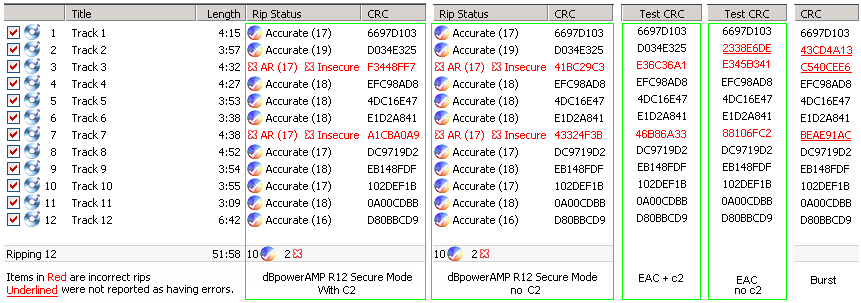
    Spoon - I was going to give that answer but looking over the accuraterip description it isn't immediately clear whether the first rip (or first two rips if operating without C2) is/are actually burst (vs. secure). It probably wouldn't make sense if they weren't burst, but just thought it might be worth clarifying by stating that explicitly in the diagrams on this page:

    dBpoweramp Music Converter - mp3 converter, FLAC, WAV, AAC and Apple Losslesss. Free Download (21 day full trial), start converting today


    -brendan

    Leave a comment:


  • Spoon
    replied
    Re: dBpoweramp Batch Ripper: Discussions

    >ripping so that if the disc looks up in AccurateRip then it will be done in Burst Mode if not it will be done via a secure rip.

    This is effectively how our secure mode works, it will finish after 1 pass if accuraterip can verify the track (so it is effectively burst).

    Leave a comment:


  • bhoar
    replied
    Re: dBpoweramp Batch Ripper: Discussions

    Originally posted by RipTheWorld
    Well I think the best one to start with is the Mediatechnics 4 drive robot with a 600 disc capacity. Picture here: http://www.mediatechnics.com/images/.../new4drive.gif

    It may well be that it has been re-badged from another manufacturer, but the one I have came from MediaTechnics. I am fairly certain if you contact them they will give you the serial command set. Of special interest is the 'Shake' command which picks up a disc and then shakes it to try and free CDs stuck to the bottom.
    Cool. I've got the two drive variation of that robot (Fusion PX 250-disc w/ snub-length/newer picker) and do have an early (2003) revision of the documentation on the serial command set for the Fusion series (might also have later copies). The shake mode has been very nice when dealing with sticky discs.

    I have found the manufacturers/resellers somewhat reluctant to share programming/SDK documentation unless you have a specific product/solution in mind and have an existing business. However, Spoon should have no problem here.

    Originally posted by RipTheWorld
    The other robot I have is not currently running windows (and may not do in the future) so its best to stick with this one for now.
    Still I am curious about that one as well.

    -brendan

    Leave a comment:


  • RipTheWorld
    replied
    Re: dBpoweramp Batch Ripper: Discussions

    Didn't check this the other day, but is there a way to set the ripping so that if the disc looks up in AccurateRip then it will be done in Burst Mode if not it will be done via a secure rip.

    Ripping profiles that could be saved in conjunction with file formats would be very useful. Some sort of if, and, or basic functionality would be useful.

    if [AccurateRip-available]{
    rip in burst mode
    check accurate-rip
    if [burst-mode-error]{
    secure rip
    }
    else{
    secure rip
    if [secure-mode-correct]{
    submit acurate rip
    }
    }

    Automatic AccurateRip submission I think is a must as it would increase the database size pretty quickly.

    Leave a comment:


  • RipTheWorld
    replied
    Re: dBpoweramp Batch Ripper: Discussions

    RTW - what hardware (robotic, changer or otherwise) are you using in your environment. Make/Model and if possible, a link to a picture if it's not clear (e.g. MediaForm/MF-Digital uses the name "Scribe" for at least two different hardware types).
    Well I think the best one to start with is the Mediatechnics 4 drive robot with a 600 disc capacity. Picture here: http://www.mediatechnics.com/images/.../new4drive.gif

    It may well be that it has been re-badged from another manufacturer, but the one I have came from MediaTechnics. I am fairly certain if you contact them they will give you the serial command set. Of special interest is the 'Shake' command which picks up a disc and then shakes it to try and free CDs stuck to the bottom.

    The other robot I have is not currently running windows (and may not do in the future) so its best to stick with this one for now.

    Leave a comment:


  • bhoar
    replied
    Re: dBpoweramp Batch Ripper: Discussions

    Originally posted by RipTheWorld
    Just trying to help as I think this program has real potential.
    RTW - what hardware (robotic, changer or otherwise) are you using in your environment. Make/Model and if possible, a link to a picture if it's not clear (e.g. MediaForm/MF-Digital uses the name "Scribe" for at least two different hardware types).

    -brendan

    Leave a comment:

Working...