
Re: getting dbpoweramp to recognize and rip to my VortexBox
Thanks for the screenshots and the info, it is a little clearer now. I agree with Spoon here, as your Windows 10 Home PC isn't seeing the Vortexbox as a device under Network >> Computer.
If your networking knowledge is not good, perhaps Vortexbox have support or a forum where you can ask for advice on how to setup the NAS to allow you to create the \\VORTEXBOX\files\music\flac\ network location in your Windows 10 Home PC. Only when this network location is created in your Windows 10 Home PC, can you use the location from within dBpoweramp.
... just digging around on the web and the VortexBoxUK User Guide suggests that the VortexBox music/flac is a default share and should be visible on the Network, so something is not quite right here.
I also found this Vortexbox forum thread: Windows Can't See VortexBox Computer, which may help you and if not, at least it gets you to the support forums.
-
Re: getting dbpoweramp to recognize and rip to my VortexBox
What you are seeing is the nas appearing as a media player, not a network attached storage (NAS). You would have to check that file sharing is setup on the NAS, because your PC is not seeing that.Leave a comment:
-
Re: getting dbpoweramp to recognize and rip to my VortexBox
Yes, I did try to create a new network location, it didn't work. I didn't get an error message, per se, but it did say it couldn't find the vortexbox. Attached is a screen shot of what I see when I select This PC, and another of what I see when I double click on Network.
Leave a comment:
-
Re: getting dbpoweramp to recognize and rip to my VortexBox
You did not answer my question, what happened when you tried to create a new network location? Any error message?
What happens when you double-click Vortexbox on the This PC screen?
Can you post screenshots, so we get a better idea of what you are seeing?Leave a comment:
-
-
Re: getting dbpoweramp to recognize and rip to my VortexBox
Still no luck with any of the suggestions. I may have seen where the problem lies. The Vortexbox shows up on the This PC screen under Network Locations, but does not show up in the left-hand column under Network. I think it needs to show up there, but I can't figure out how to accomplish that.Leave a comment:
-
-
Re: getting dbpoweramp to recognize and rip to my VortexBox
follow these instructions:
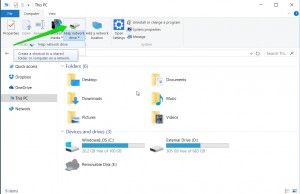
When you get to the example using the name:
\\SIMPLESHARES\MyHome
instead use:
\\192.168.x.xx\files
where "192.168.x.xx" is the IP address of your VB server. (I'm doing this from memory, I *think* it is files at the end and not "storage". Can't hurt to try this, it won't mess anything up.
EDIT: You might be able to instead use:
\\VORTEXBOX\files
Then once you've setup this, you can use that letter drive in dbpa for file destination.Last edited by garym; November 15, 2017, 09:14 PM.Leave a comment:
-
Re: getting dbpoweramp to recognize and rip to my VortexBox
My current computer is a brand new Dell running Windows 10 Home. I tried the suggestions you gave, but without success (I'm not the world's greatest at this stuff).Leave a comment:
-
Re: getting dbpoweramp to recognize and rip to my VortexBox
What platform/OS is the new computer, windows, apple or other? Can you access the vortexbox from the OS?
Try to access the vortexbox (create a new network location) from within the OS (i.e. in windows file explorer or apple finder).Leave a comment:
-
getting dbpoweramp to recognize and rip to my VortexBox
My old computer died suddenly, and I cannot get my new computer to get dbpoweramp to communicate with my vortexbox. Any advice would be welcome. I was able to determine that the path address on my old computer was \\VORTEXBOX\files\music\flac\ but typing that in the path address on dbpoweramp on my new computer doesn't work.


Leave a comment: