illustrate
Products            Buy            Support Forum            Registrations            About           
 

I do not wish to see any form of alphabetical grouping

Collapse
X
 
  • Time
  • Show
Clear All
new posts
  • alan9990

    • Mar 2026
    • 4

    #1

    I do not wish to see any form of alphabetical grouping

    Apologies if this has already been answered, but I couldn't find it via search.

    Still in my eval period (having just returned). I'll be very happy to spend future time to tweak the UI to suit my needs, but for now the one thing I really wish to get rid of entirely is this (in my opinion) rather bizarre insistence on alphabetical grouping.

    I want to be able to open a chosen category and simply see the contents displayed by whichever sort order I specify, but am not interested in having that content subdivided and served alphabetically e.g. ABC, DEF, GHI etc. or any combination thereof.

    Is there a simple toggle or some other setting I missed to entirely disable this (very unhelpful) feature?
  • Spoon
    Administrator
    • Apr 2002
    • 45859

    #2
    Select a tree item in the configuration section and uncheck 'a to z grouping'

    Spoon
    www.dbpoweramp.com

    Comment

    • alan9990

      • Mar 2026
      • 4

      #3
      oh oh!! But... very noob level question here...

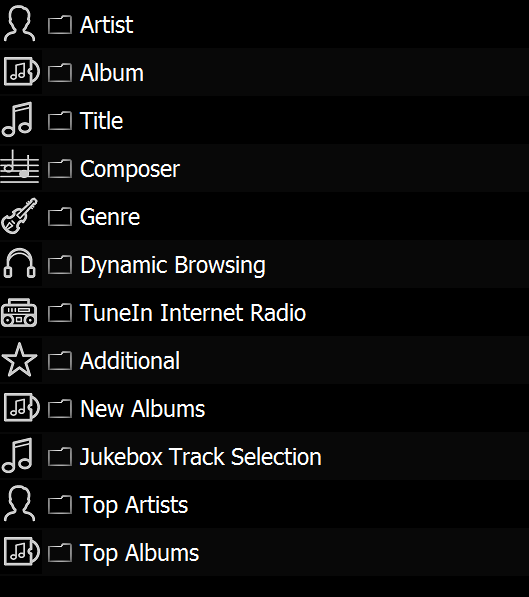
      I'm running this on Arch Linux. My main page looks like this:
      Click image for larger version

Name:	asset1.png
Views:	2
Size:	58.1 KB
ID:	338210


      So while things like "Options" and "Advanced" do open different panels respectively, I've never ever seen a "Configuration" window - hence my question I suppose.

      I'm certain I can get this set up the way I wish... but it's currently unclear if I even have it running correctly?

      My current issue is also that, with 11 days left on the trial (okay, so I've been away trying to use Minimserver but gave up) when I try to access the server remotely, EVERY.SINGLE content directory is empty!!

      I've tried turning firewalls on and off. I've deleted and recreated the cache... I've done everything I can possibly think of, but whereas this worked flawlessly the first time out, since going away and returning, suddenly it doesn't work at all. I'm absolutely baffled as to why but can perfectly accept that I'll slap my forehead once I finally find out what stupid thing I have overlooked or set incorrectly.

      For now though, I have no idea at all how to access the panel shown in the link you provided above.

      kind regards, thank you hugely for the help - kind of important when I have a brand new (and expensive) DAC sitting there that's currently useless.

      Comment

      • Spoon
        Administrator
        • Apr 2002
        • 45859

        #4


        Under browse tree, likely the Advanced page.

        "I try to access the server remotely, EVERY.SINGLE content directory is empty!!"

        You cannot access from any network is not part of the home network.
        Spoon
        www.dbpoweramp.com

        Comment

        • vilsen
          dBpoweramp Supporter
          • Jul 2018
          • 222

          #5
          Originally posted by alan9990
          the one thing I really wish to get rid of entirely is this (in my opinion) rather bizarre insistence on alphabetical grouping.

          I want to be able to open a chosen category and simply see the contents displayed by whichever sort order I specify
          Is chronological sort order what you want? If so you can browse by "Album by Release". (I don't remember how the default tree looks, you might have to configure it to your needs)

          Comment

          • alan9990

            • Mar 2026
            • 4

            #6
            Yay! All working now, many thanks for all the help. After configuring the browse tree to my liking, I simply stopped and restarted the server. Now everything is displayed as desired. It's also very fast - which is fantastic too.

            Comment

            Working...