
Re: Plextor PX-40 TSI / Ultraplex 40 max
Pablogm i recieve sony , how i must set settings?
-
Re: Plextor PX-40 TSI / Ultraplex 40 max
when i recieve sony from ebay i will send you message so then we can make setup for him and liteon ... it will be in next 10 daysLeave a comment:
-
-
Re: Plextor PX-40 TSI / Ultraplex 40 max
this is all for plextor when i finish with plextor then we go to liteon and sony (sony still not have at home only liteon)Leave a comment:
-
Re: Plextor PX-40 TSI / Ultraplex 40 max
The Sony drive? As expected, doesn't cache audio data (a very good thing when reripping bad frames).Leave a comment:
-
Re: Plextor PX-40 TSI / Ultraplex 40 max
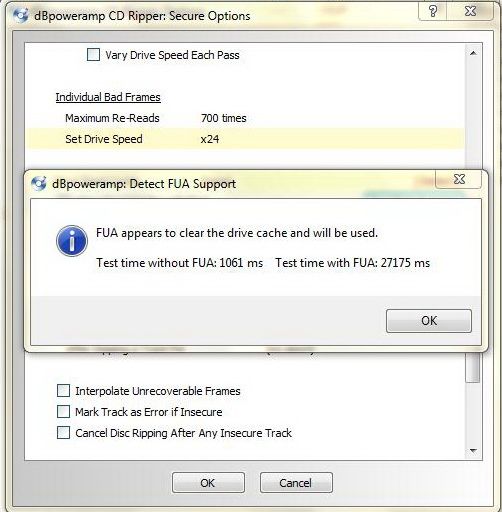
Cache test says this, you are running the FUA test actually.
"---------------------------
dBpoweramp: Detect Drive Cache
---------------------------
This function will detect the CD drive read cache size. The size of the read cache is important for secure ripping as ripping retries will be delivered from the cache rather than the CD if the cache size is not known.
Detection will take less than one minute, make sure no other program is running (including media players) during detection. Please insert an audio CD (that has no scratches) and click OK to begin.
** Using FUA to clear cache (if FUA is working drive cache should return 0 KB) **"Leave a comment:
-
-
Re: Plextor PX-40 TSI / Ultraplex 40 max
¿The Plextor drive? FUA works as expected, but that option is the one used to detect FUA support. The cache test, for non real Plextor (if FUA works, set cache as 0 KB, none), is the one located above: [Detect]Leave a comment:
-
-
Re: Plextor PX-40 TSI / Ultraplex 40 max
I meant that you can increase the re-reads attempts of bad frames. Currently, 34. With excellent C2 support, 500-750 is a good amount.
Cache test: The Detect button next to drive read cache size, don't do multitasking when performing the test, because timings are critical to detect if a drive caches or not. Lite-On Mediatek based give lots of problems detecting the cache size, at least for me. The test is always reporting that cache size cannot be detected, due to inconsistent results. Anyway, they usually caches a lot of audio, 391 KB, 666 KB, 892 KB... so that the default setting (1,024 KB) is a safe setting.Leave a comment:
-
Re: Plextor PX-40 TSI / Ultraplex 40 max
I use 1 / 6 / 2. You can increase (because you own drives with superb C2 reporting)
you told me that increase 1/6/2 now you tell me that put 1/6/2 i don't understand?
how to do test cache?Last edited by S0nic; October 20, 2012, 02:46 PM.Leave a comment:
-
Re: Plextor PX-40 TSI / Ultraplex 40 max
1/6/2 is a good combination, when you have drive with decent C2 support. I would use this for your Plextor drive, Sony drive and Lite-On drive, because I have tested very similar drives, and C2 support is very good.
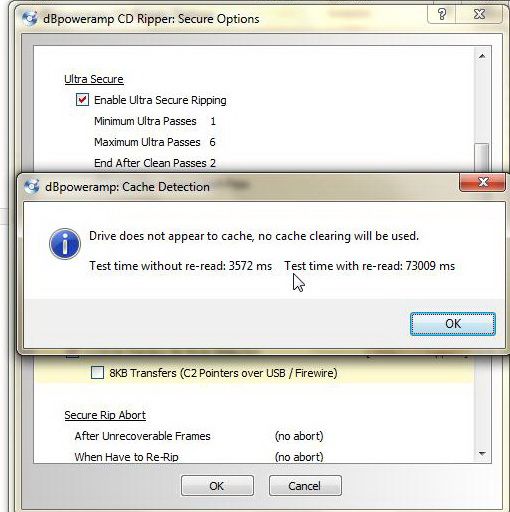
NEC chipset based drives I have tested doesn't cache audio, for example my AD-7240S and Pioneer DVR-107D/110D. You have to insert an original audio disc in very good/excellent condition, don't do multitasking, and perform the cache test. If according to that test, your drive doesn't cache audio: 0 KB (None).Leave a comment:

Leave a comment: