
Re: Plextor PX-40 TSI / Ultraplex 40 max
qpxtool.exe is a GUI for scanning discs (supports Lite-On, NEC, Pioneer, BenQ, Plextor... drives) and an alternative program to PlexTools to control several features offered by real Plextor drives. cddvcontrol is a bundled program you have to run through a command line, run the cmd.exe program of Windows.
Or you can write a cmd file to run the program. For example, write this in .txt file, and change .txt extension for .cmd. Replace e: for the actual letter of you Pioneer drive:
@cdvdcontrol --pio-limit on -d e:
@pause
-
Re: Plextor PX-40 TSI / Ultraplex 40 max
i open program qpxtool , i click on qpxtool.exe but i don't see where i can put commands?Leave a comment:
-
Re: Plextor PX-40 TSI / Ultraplex 40 max
It's a command line program. You have to open a command line window (cmd.exe) and enter these commands:
cd [Folder which contains that program]
cdvdcontrol --pio-limit on -d [LETTER OF PIONEER DRIVE]
If success, you will see this:
Code:** CDVD Control v1.4 (c) 2005-2009 Gennady "ShultZ" Kozlov Device : f: Vendor : 'PIONEER ' Model : 'DVD-RW DVR-107D' F/W : '1.22' [B]CDVD Control flags : DEVICE PIOLIMIT Speed Limit : ON[/B]
Leave a comment:
-
Re: Plextor PX-40 TSI / Ultraplex 40 max
Yes, you enable C2 and read into lead-out for this drive.
True, you own a set of excellent drives for ripping audio.Leave a comment:
-
Re: Plextor PX-40 TSI / Ultraplex 40 max
i eneble c2 and read into lead-in or lead-out is it ok?
then, now with two plextor's PX-40 TSI , sony optirac and this pioneer 11 dbk i can make great audio rips
ps i install qpxtool , how now to set pioneer to rip 24x ?Last edited by S0nic; November 14, 2012, 12:42 PM.Leave a comment:
-
Re: Plextor PX-40 TSI / Ultraplex 40 max
Keep this drive! For me, they are near perfect for dBpoweramp: NEC chipset, don't cache audio, fast, accurate, re-rip frames very fast and can overread into lead-out.
Of course, enable C2 pointers and set cache as 0 KB. You cannot set the read speed of these Pioneer drives using dBpoweramp nor other software.
Only this tool can control the read speed of these Pioneer drives:
cdvdcontrol --piolimit off -d [LETTER DRIVE] 40x
cdvdcontrol --piolimit on -d [LETTER DRIVE] 24xLeave a comment:
-
Re: Plextor PX-40 TSI / Ultraplex 40 max
pablogm i buy pioneer dvr 111 dbk can you tell how set with dbpower? i do cache test and have this message:
Drive does not appear to cache, no cache clearing will be used.
test time without reread : 5726ms with reread 13931ms
do you know something about pioneer dvr 111 dbk is he good dvd ripper? its old moldel from around 2006 maybeLeave a comment:
-
Re: Plextor PX-40 TSI / Ultraplex 40 max
i do test again with same cd with 40x and do that 2 times and i finally get same resultat of 6 , so i set like thatLeave a comment:
-
Re: Plextor PX-40 TSI / Ultraplex 40 max
I would trust in the last result, it is needed run the test at max speed. A possible proof is rip a CD heavily damaged, without C2 pointers. Let it to re-rip a few of frames, cancel and check the log. If detects missmatches, all OK, because the drive doesn't cache, and reads from CD (which returns different data each), not from cache (which would return the same data).Leave a comment:
-
Re: Plextor PX-40 TSI / Ultraplex 40 max
i try now to do cache test again , with 40x and now they don't find cache try with few cd's same thing?Leave a comment:
-
Re: Plextor PX-40 TSI / Ultraplex 40 max
ok thanks, optirac rip just fine , he rip cd'a what liteOn does not
Leave a comment:
-
Re: Plextor PX-40 TSI / Ultraplex 40 max
No, 20x/40x. I have tested similar drives, and they works better at higher speeds. And 10x is very slow, is actually 4x-10x CAV, not 10x CLV.
If the test says that the drive caches 6 KB, enter this amount.Leave a comment:
-
Re: Plextor PX-40 TSI / Ultraplex 40 max
this is resultat how much to set cache?
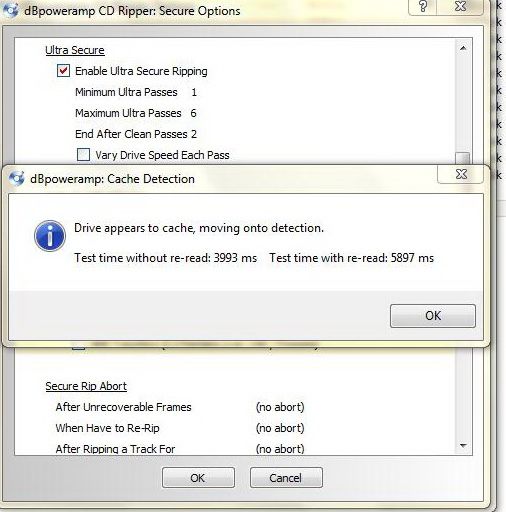
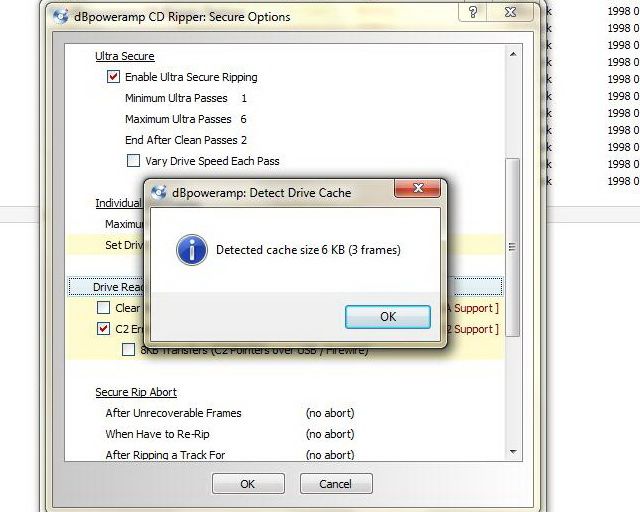
Leave a comment:
-
-
Re: Plextor PX-40 TSI / Ultraplex 40 max
Try the same settings that you configured for Plextor drive, but without FUA and read speed 40x. Test if actually doesn't cache audio data. If doesn't cache audio data: 0 KB.Leave a comment:


Leave a comment: