PDA

View Full Version : Screenshot


PeterShad
03-10-2004, 11:06 PM
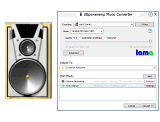
My OS is Windows 98SE. I have downloaded dBpowerAMPconverter v10.1, but my screen does NOT resemble the screenshot as shown on the website. It is just a small screen, which just states:- "Select music files to convert".
How can I get the full version?
peter@shadwick.freeserve.co.uk

Wayne
03-10-2004, 11:39 PM
It sounds like you are running dMC from the Start Menu. Did you select a file to convert?

In the screen shot the background window is the CD Audio Input program which should start up whenever you insert a CD (or it can be started manually). The foreground window will only appear once you select to convert a file or rip a track from a CD.

http://www.dbpoweramp.com/images/dmc/dmc.png

You have the full version of dMC. Although there are additional addons which can be downloaded, they are optional.

I would recommend registering the powerpack as it adds some useful features to dMC. Being able to modify MP3 files' id-tag information by right-clicking on it is very useful.

Wayne

Unregistered
03-15-2004, 09:00 PM
Many thanks - you are quite correct - the full screen appeared once I had selected a file. I have now registered the PowerPack.